Flashing Steps
Tools/Software Needed:
Section titled “Tools/Software Needed:”- JLink Plus Segger 8.08.28
- FS5600 FREEDOM board
- PF5020 FREEDOM board
- NXP GUI Software
- NXP S32DS v3.5 Software
Flash YIS2 (FS5600)
Section titled “Flash YIS2 (FS5600)”-
Connect 3.3V from the FREEDOM board to X32.1. This supplies 3.3V to the mainboard to allow YIS2 to be flashed.
-
Connect I2C from FREEDOM board to X27 and GND to X32.2.
-
Apply 12V to KL30 and IGN pins.
-
Open NXP GUI software, select FS5600. Press
Start. Press and hold SW3 and then selectTest Modeand pressApply. Continue to hold SW3 until the PMIC has been programmed. -
Once the PMIC has successfuly entered
Test Mode, select theProgmenu on the left side and press theBrowsebutton to select a config script. The config script can be found here: -Q:\Projects\11704_NeuralPlex\Rev_C\060_SW\YIS2_3.3V_FS5600_BA0_OTP_Rev_A_22MHz_450KHz_FSS.txt -
Now that the script is selected, continue to hold SW3 and then press
Program. -
After PMIC has been programmed, depress SW3, disconnect KL30 and IGN pins, and disconnect 3.3V.
-
Power on KL30 and IGN and PMIC should now be programmed. Verify by measureing the voltage outputs on the PMIC.
Flash S32K
Section titled “Flash S32K”-
Before flashing the S32K, R164 must be depopulated on the mainboard.
-
Connect the JLink Plus Segger to the JTAG header (X1) on the mainboard.
-
Apply 12V to KL30 and IGN pins.
-
Open NXP S32DS.3.5 Software and flash S32K.
Flash YIS17 (PF5020)
Section titled “Flash YIS17 (PF5020)”-
Connect I2C from FREEDOM board to X27 and GND to X32.2.
-
Apply 12V to KL30 and IGN pins.
-
Open NXP GUI software, select PF5020. Press
Start, and then selectTest Modeand pressApply. -
Once the PMIC has successfuly entered
Test Mode, select theProgmenu on the left side and press theBrowsebutton to select a config script. The config script can be found here: -Q:\Projects\11704_NeuralPlex\Rev_C\060_SW\YIS4_YIS17_PF5020_ASILB_BA0_OTP_SW1=1.8V SW2=1.1V SWND=3.3V ILIM=2.6A LDO=3.3V.txt -
Now that the script is selected, press and hold SW4 and then press
Program. -
After PMIC has been programmed, depress SW4, disconnect KL30 and IGN pins.
-
Power on KL30 and IGN and PMIC should now be programmed. Verify by measureing the voltage outputs on the PMIC.
Flash YIS3 (FS5600)
Section titled “Flash YIS3 (FS5600)”-
Connect I2C from FREEDOM board to X28 and GND to X32.2.
-
Apply 12V to KL30 and IGN pins.
-
Open NXP GUI software, select FS5600. Press and hold SW5 and then select
Test Modeand pressApply. Continue to hold SW5 until the PMIC has been programmed. -
Once the PMIC has successfuly entered
Test Mode, select theProgmenu on the left side and press theBrowsebutton to select a config script. The config script can be found here: -Q:\Projects\11704_NeuralPlex\Rev_C\060_SW\YIS3_FS5600_BA0_OTP_Rev_A_22MHz_450KHz_FSS.txt -
Now that the script is selected, continue to hold SW5 and then press
Program. -
After PMIC has been programmed, depress SW5, disconnect KL30 and IGN pins.
-
Power on KL30 and IGN and PMIC should now be programmed. Verify by measureing the voltage outputs on the PMIC.
Flash YIS4 (PF5020)
Section titled “Flash YIS4 (PF5020)”-
Connect I2C from FREEDOM board to X27 and GND to X32.2.
-
Apply 12V to KL30 and IGN pins.
-
Open NXP GUI software, select PF5020. Press
Start, and then selectTest Modeand pressApply. -
Once the PMIC has successfuly entered
Test Mode, select theProgmenu on the left side and press theBrowsebutton to select a config script. The config script can be found here: -Q:\Projects\11704_NeuralPlex\Rev_C\060_SW\YIS4_YIS17_PF5020_ASILB_BA0_OTP_SW1=1.8V SW2=1.1V SWND=3.3V ILIM=2.6A LDO=3.3V.txt -
Now that the script is selected, press and hold SW6 and then press
Program. -
After PMIC has been programmed, depress SW6, disconnect KL30 and IGN pins.
-
Power on KL30 and IGN and PMIC should now be programmed. Verify by measureing the voltage outputs on the PMIC.
Flash YIS12 (SJA1110)
Section titled “Flash YIS12 (SJA1110)”-
Apply 12V to KL30 and IGN pins.
-
Connect the Lauterbach debugger to the JTAG header (X4) on the mainboard.
-
Open NXP S32DS.3.5 and open SJA1110 project.
-
Flash the SJA1110 using Lauterbach or compatible debugger/flasher.
Flash entire eMMC
Section titled “Flash entire eMMC”-
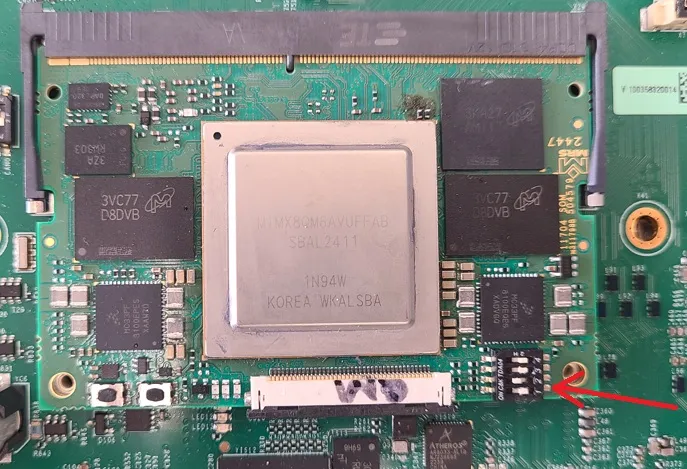
Set DIP switch to Serial Download (1=off, 2=on, 3=off, 4=off)
-
Apply 12V to KL30 and IGN pins.
-
Unzip the sdimg.gz file from the Yocto build: - Command:
gunzip neuralplex-image-<machine>-neuralplex.sdimg.gz -
Flash the bootloader and rootfs to the emmc: - Command:
sudo uuu -b emmc_all imx-boot neuralplex-image-<machine>-neuralplex.sdimg
Flash rootfs only
Section titled “Flash rootfs only”-
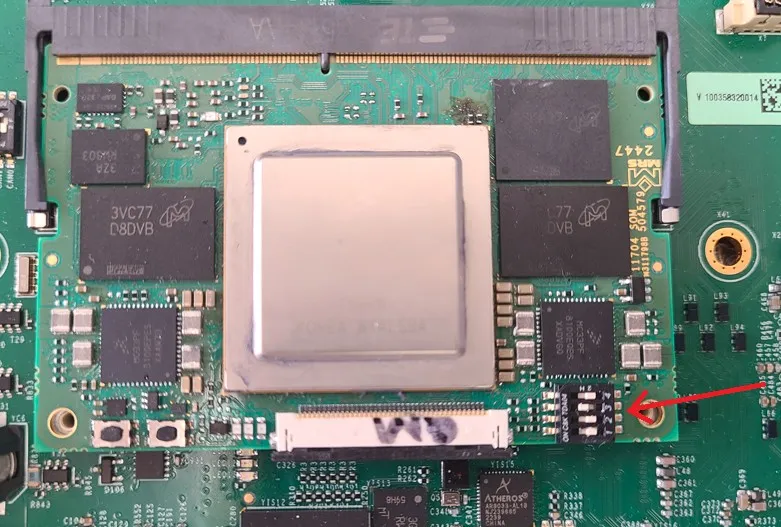
Set SOM DIP switch to eMMC (1=off, 2=off, 3=on, 4=off)
-
Apply 12V to KL30 and IGN. Pause u-boot as the board begins to boot.
-
Mount eMMC as USB drive:
- machine=imx8qm-np:
ums 0 mmc 0 - machine=imx95-np:
ums 1 mmc 0
- machine=imx8qm-np:
-
Flash the rootfs:
dd if=neuralplex-image-<machine>-neuralplex.sdimg of=/dev/sda bs=4M status=progress